
#bkafricazim
#bkafricazim
Sign up on #bkAfricaZim in just a few steps! Fill in your details at Register Here, receive a verification code via email or WhatsApp, enter the code at User Profile, and you're all set! Start managing your shop, services, or orders hassle-free. ????
Free
$0 / month
- 5 products
- 10MB storage
- Quick Deals listing
- ShopPal WhatsApp chatbot
- Service provider directory listing
- Products listed on ShopPal Online Mall
- ShopPal Mobile Application
- AI-powered product search
- 3 months FREE trial
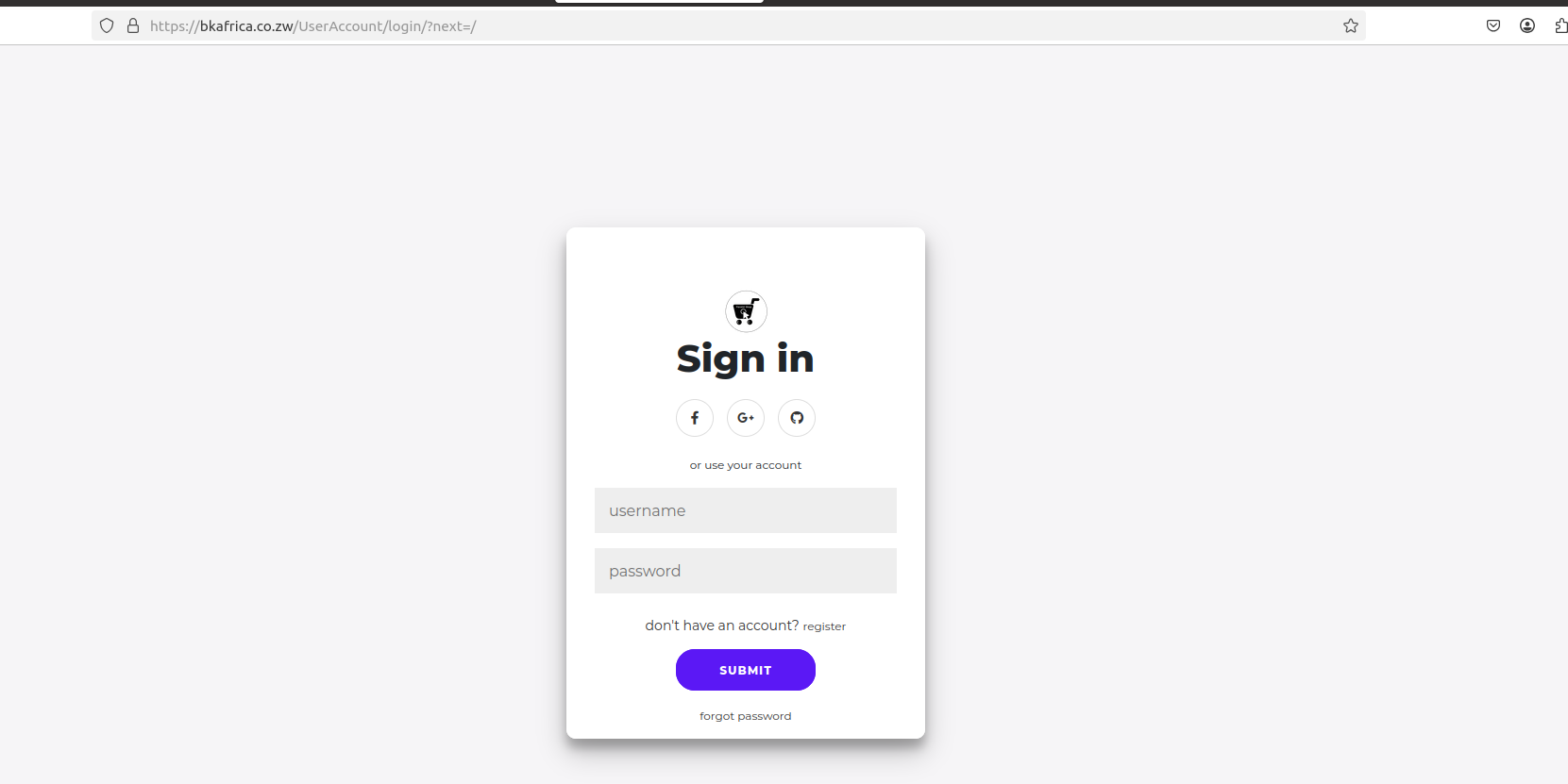
How to sign in or register an account.
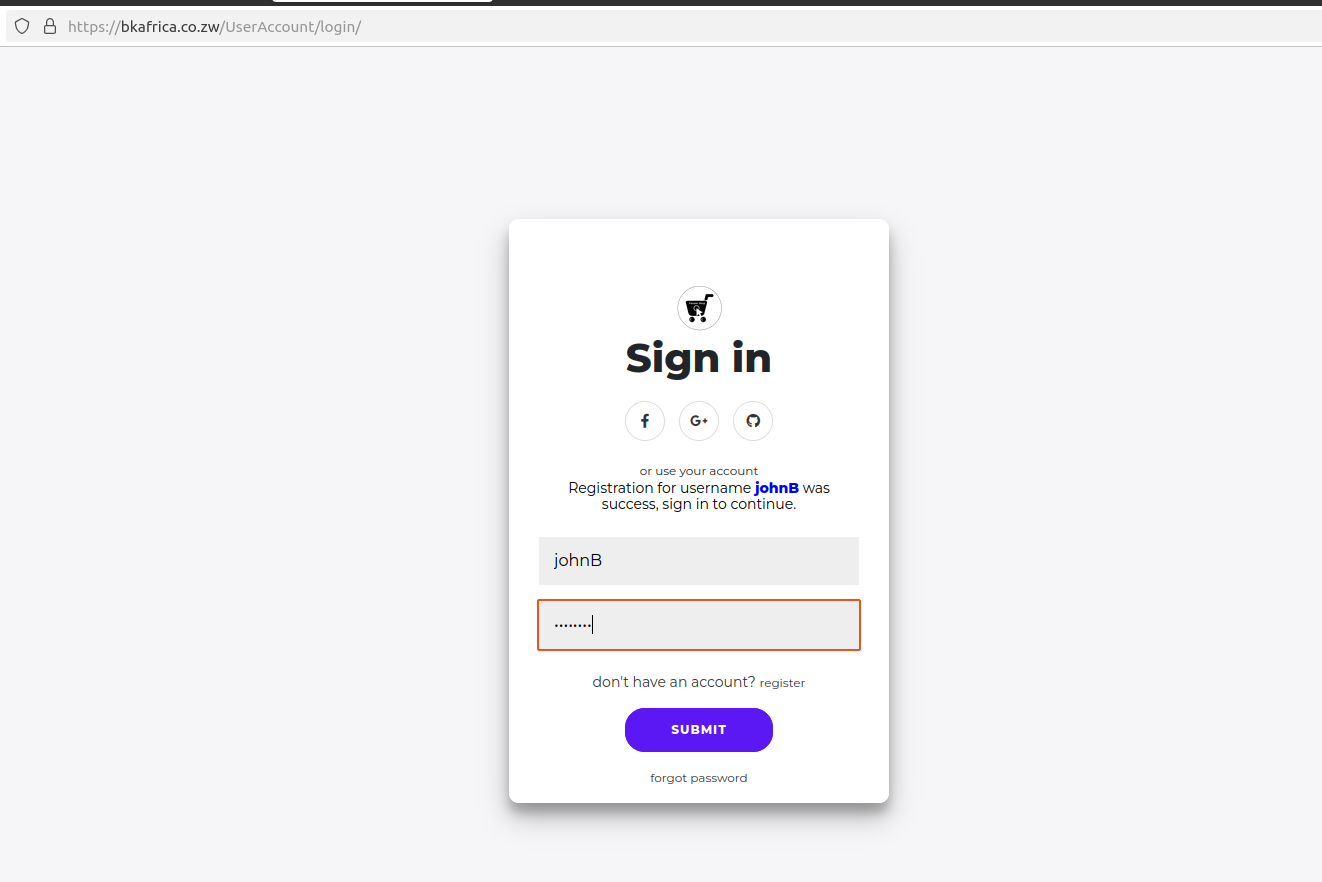
How to Sign In to Your #bkAfrica Account If you already have an account on #bkAfricaZim, follow these simple steps to access your dashboard and services:
Step 1: Visit the Login Page
Click the link below to go directly to the sign-in page: ???? Sign In Page
Step 2: Enter Your Credentials
Type in your username or email address. Enter your password.
Step 3: Click "Submit" Once your details are entered, click the Submit button to log in to your account.
???? Forgot your password? Click on the "Forgot Password" link to reset it. If you don't have an account yet, register here to get started! ????
- Login: Entering your username and password, and clicking Submit to sign in.
- Registration Process: fill in personal details, choose verification via email or WhatsApp, and receive a verification code.
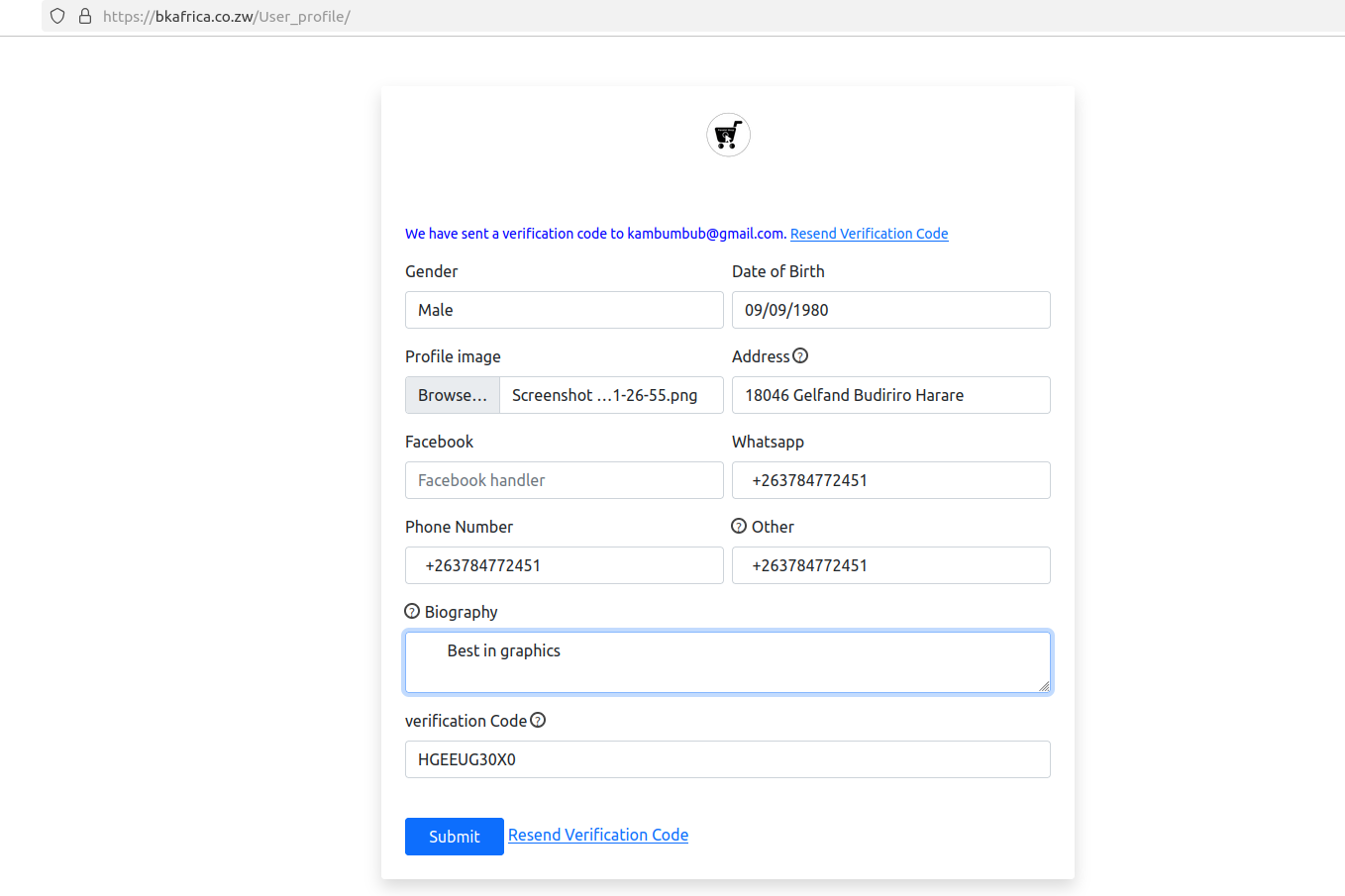
- Verification: Enter the received code at User Profile, complete optional profile details, and submit to activate the account.
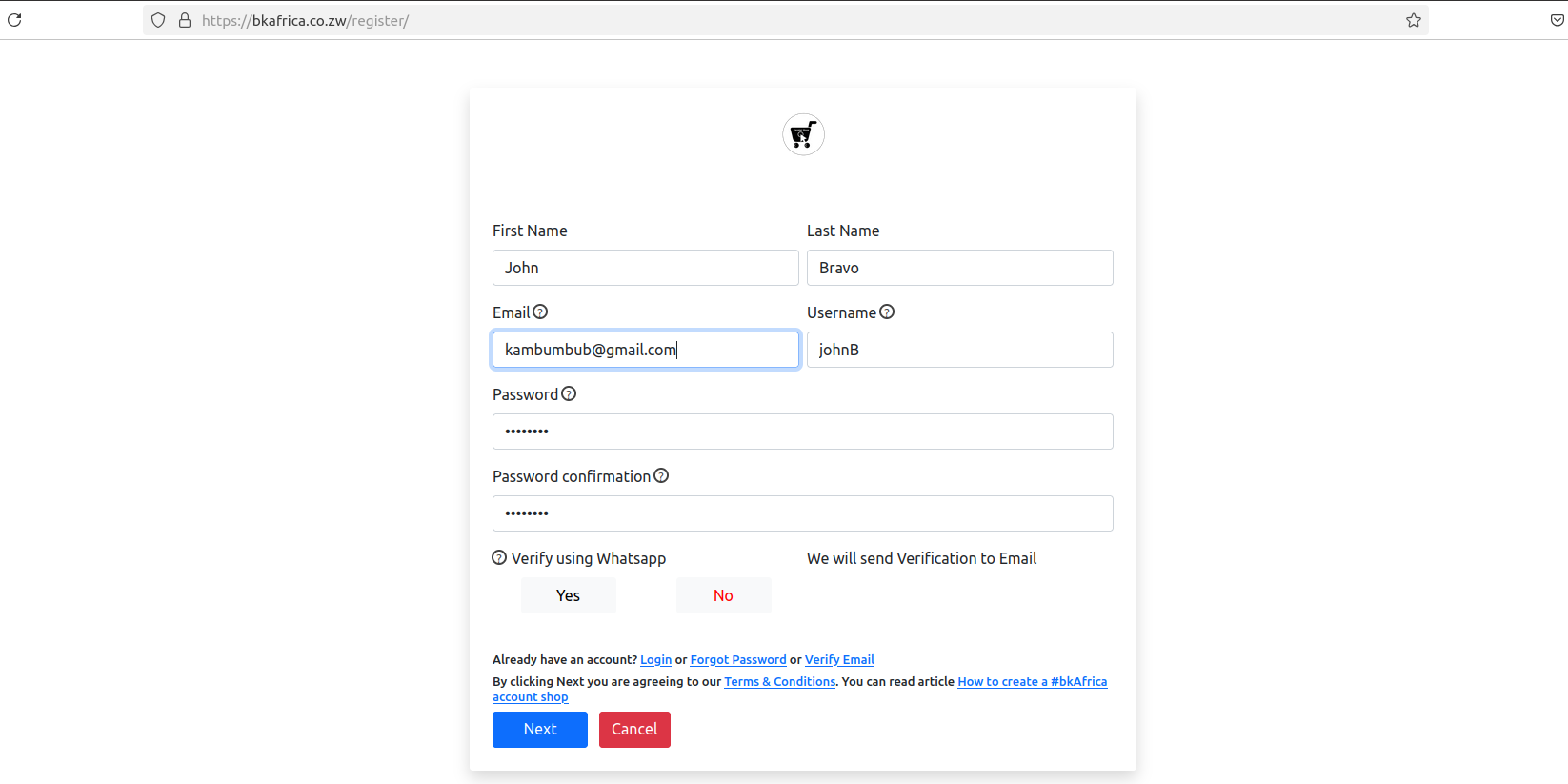
How to Register on #bkAfricaZim Creating an account on #bkAfricaZim is simple and quick. Follow these steps to get started:
Step 1: Visit the Registration Page Click the link below to access the sign-up form: ???? Register New User
Step 2: Provide Your Details Fill in the required information:
✅ First Name & Last Name – Enter your full name.
✅ Email – Use a valid email address for verification.
✅ Username – Choose a unique username for your account.
✅ Password & Confirmation – Create a strong password and confirm it. .
Step 3: Check Your Email for a Verification Code
After submitting the form, an email will be sent to your registered email address with a verification code. ???? Check your inbox (or spam folder) and enter the code to complete your registration.
Step 4: Agree to the Terms Before proceeding, make sure you read and agree to the Terms & Conditions.
Step 5: Click "Next" After entering all details, click the Next button to continue.
???? Already have an account? Click Login to sign in instead. Forgot your password? Use the Forgot Password link to reset it. ???? Start your journey with BK Africa today!
Next Stage: Verifying Your Account
Once you receive the verification code via email or WhatsApp, follow these steps to complete the registration process:
Step 1: On the Profile Verification Page, enter the Verification Code ✅ . Check your email or WhatsApp for the 10-digit verification code.
✅ Enter the code in the "Verification Code" field.
Step 3: Complete Your Profile (some fields are optional but recommended)
???? Gender & Date of Birth – Provide basic details.
???? Profile Image – Upload a profile picture.
???? Address & Contact Information – Fill in your phone number, WhatsApp number, and Facebook handle.
???? Biography – Add a short description about yourself or your business.
Step 4: Click "Submit" ✅ Once all details are filled in, click the "Submit" button to complete the process.
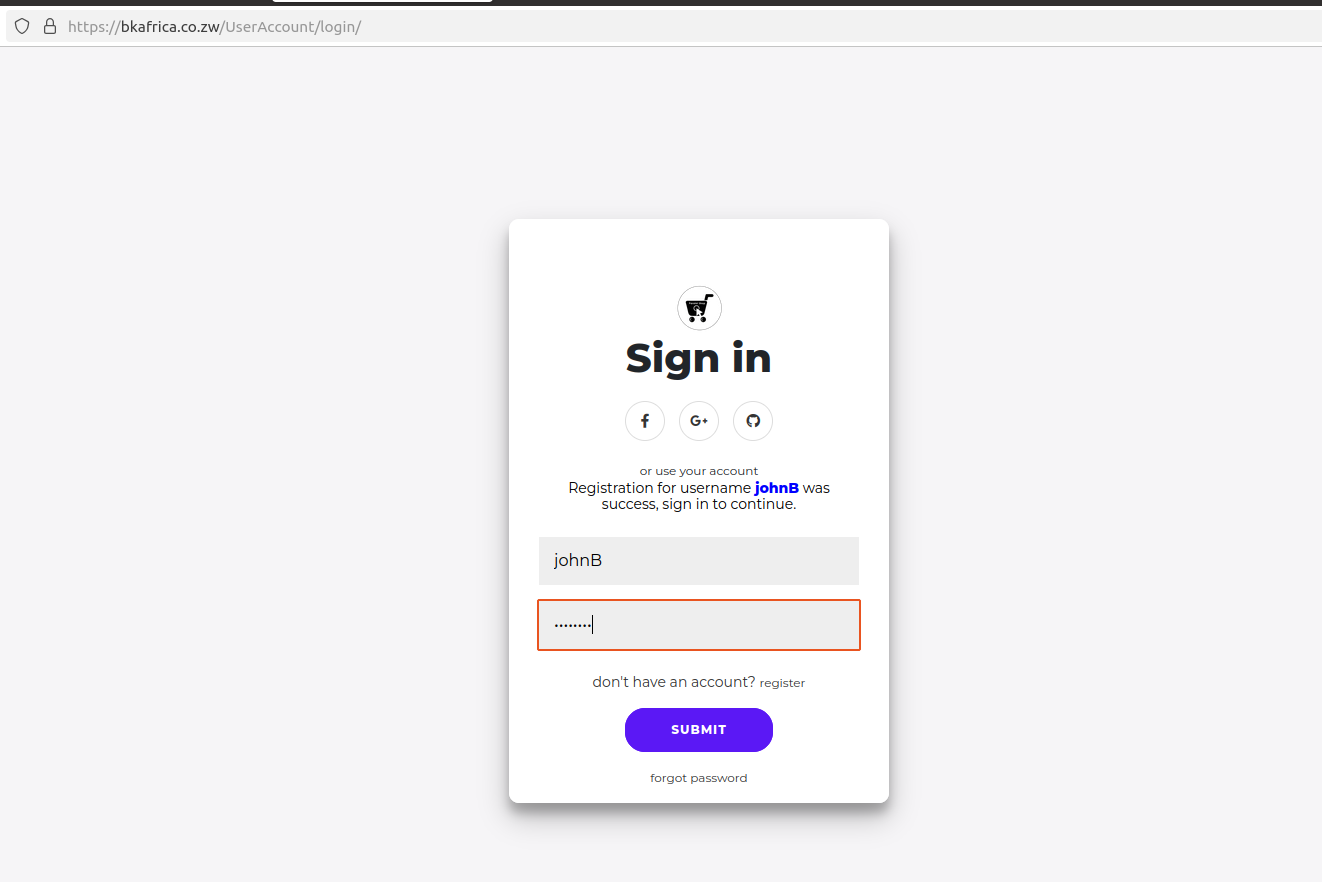
Step 5: Access Your Account by loging in with username and password.
???? After successful verification, you can now log in and start using #bkAfricaZim's platform to manage your shop, browse products, and connect with customers.
#bkAfricaZim
#onlineShopping
#onlinePlatform
#WhatsappChatbot
More Blogs & Tips
Here are blogs and tips, and tutorials
How to sign in or register an account.
(5mins)
Sign up on #bkAfricaZim in just a few steps! Fill in your details at Register Here, receive a verification code via email or WhatsApp, enter the code…
The Future of E-Commerce in Zimbabwe Through WhatsApp & Web Integration
(4mins)
Discover ShopPal by bkAfrica—a revolutionary platform transforming e-commerce in Zimbabwe. With a web application and a WhatsApp chatbot, ShopPal ena…
How to create an online shop on shopPal
(15mins)
Set up your online shop on ShopPal in just a few steps! Verify your account, choose a package, add shop details, and list your first product. Start y…
How to use shopPal Chatbot
(4 mins)
This guide shows you how to interact with the WhatsApp chatbot to browse, view, and purchase products easily using buttons, lists, and natural langua…